


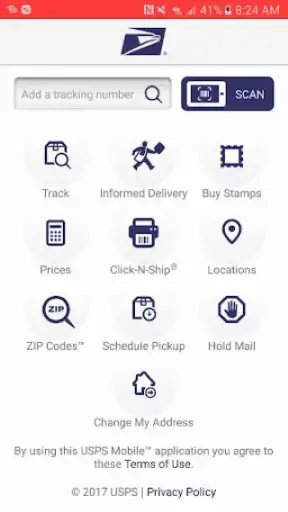
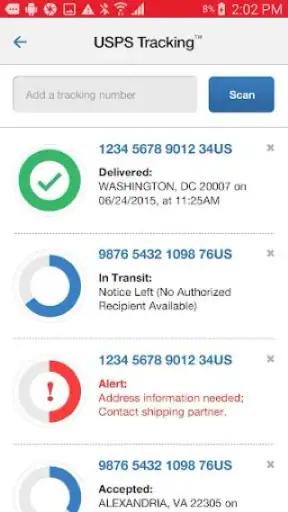
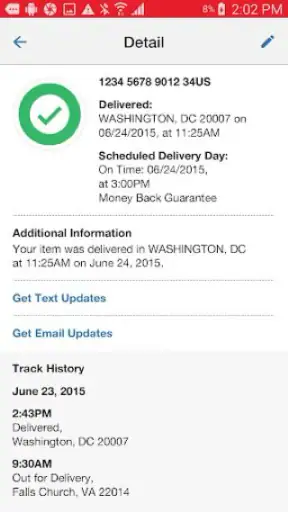
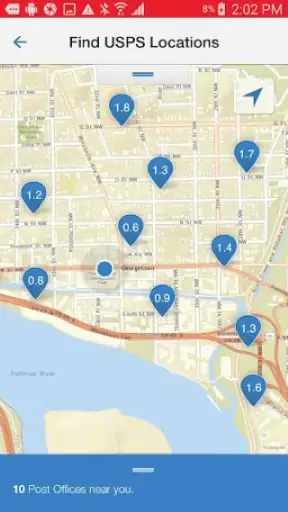
When I need to deal with the United States Postal Service while I am away from a computer, I would rather use one official starting point than search through several unrelated pages. That is the practical reason I find USPS MOBILE® useful. It is a free business app from United States Postal Service®, built around access to the postal service’s most popular tools while you are on the move.
My view is fairly simple: this is not an app I would install for entertainment or constant daily browsing. It is a utility I want available before I need it. The value appears when I am preparing a shipment, checking a delivery, arranging a postal task, or trying to find the right official information without guessing which third-party service is trustworthy.
The app has a 4.7 average from around 75 thousand ratings and has passed 1 million installs, which fits my impression that it is intended for ordinary, practical use rather than a narrow professional audience. It is free, rated for Everyone, and the current version is 6.2.1. Those details make it easy to recommend as a low-commitment companion for postal errands, although the usefulness still depends on what I actually need to do.
What I look for before choosing a postal app
My first decision criterion is trust. Postal information is connected to addresses, packages, labels, and delivery expectations, so I prefer an official tool when the task concerns USPS directly. Using a general search engine can work, but it often leaves me sorting through advertisements, old explanations, and services that want to redirect me into their own shipping process. An official app reduces that uncertainty.
The second criterion is speed. A good mobile utility should help me reach the relevant postal task without making me recreate a desktop workflow on a small screen. I do not expect a phone app to replace every full-service shipping counter, but I do expect it to be useful when I am standing in a hallway, packing a box, or checking something from the passenger seat while someone else is driving.
The third criterion is coverage. I want one place that handles the common USPS jobs rather than a separate app for each question. The app’s role is broad access to popular USPS.com tools, so I judge it less like a specialized package tracker and more like a mobile front door to the postal service.
That distinction matters. Someone who only wants to watch one shipment may prefer a simpler tracking-focused experience. Someone who ships frequently may want a dedicated shipping platform with inventory, customer records, or batch workflows. I would choose USPS MOBILE® when I want official access to several postal tasks and do not need a warehouse system.
A realistic everyday use case
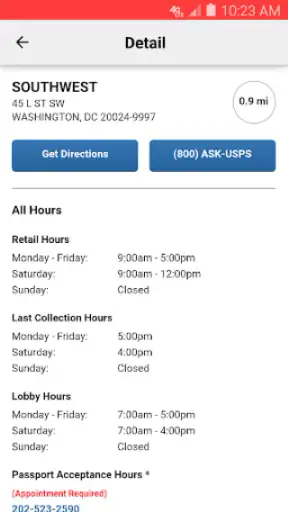
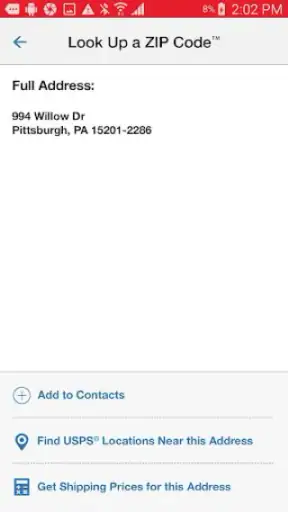
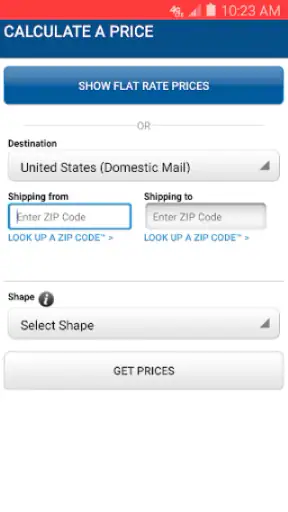
Imagine I have sold an item online and need to send it from home. I can use the app as my first check before leaving: confirm the destination details I am working with, look for the relevant postal tool, and prepare myself for the next step instead of arriving at a post office with incomplete information. If I am later waiting for the parcel to move, I can return to the same official source rather than rely on a message from an unknown tracking website.
The benefit here is not dramatic automation. It is fewer small decisions. I do not have to remember which USPS page handles which task, and I do not have to treat a search result as if it were automatically official. For occasional users, that reduction in friction is more valuable than a long list of advanced controls.
Where USPS MOBILE® works particularly well
The strongest part of the experience is its official identity. Because United States Postal Service® develops it, the app makes sense for people who want USPS-related information and tools in a recognizable environment. I would be more comfortable using it for a delivery question or a shipping preparation step than an unfamiliar app that merely collects postal links.
It also suits people who move between different kinds of postal errands. A parent arranging a return, a student sending documents, a small online seller handling occasional orders, and a traveler checking a delivery can all approach the app from different directions. The common thread is not heavy shipping volume; it is the need to reach USPS services without opening a laptop.
Another useful quality is that the app is free. That makes the decision easy for someone who is unsure whether a mobile postal tool will become part of their routine. I can install it before a busy week, use it for a particular task, and keep it available for the next time a package or mailing question appears without adding a subscription decision to the process.
I also like the idea of using it as a verification step. If I receive a delivery notification from another source, I can check the matter through the official USPS route instead of treating every message as reliable. That does not eliminate the need for common sense, but it gives me a better place to begin when a notification looks incomplete or confusing.
Three practical habits that improve the experience
I open the app before I start packing, not after I am already at the counter. That lets me understand which postal task matches my situation and prevents me from confusing a general information page with a completed shipping action.
I use the official app as a confirmation layer when another service gives me a tracking or delivery message. The useful insight is that I do not need to abandon a marketplace or retailer app; I can compare its information with the USPS source when timing or status matters.
I keep my purpose narrow during a quick visit. Rather than browsing every available tool, I decide whether I am checking a delivery, preparing a mailing, or looking for a postal location or service. That small habit makes a broad utility feel less scattered on a phone.
These are simple workflows, but they are the kind that make an official utility worthwhile. The app is most effective when I treat it as a reliable access point, not as a replacement for every part of my shipping life.
What the app is not trying to be
I would not mistake this app for a complete business shipping dashboard. If I were managing a large catalog, printing many labels in a single session, reconciling postage expenses, or coordinating several carriers, I would probably need a specialized service. USPS MOBILE® is better suited to individual postal tasks and everyday access than to complex operations.
That limitation is not necessarily a flaw. A focused official utility can be easier for a casual user to understand than a platform filled with seller tools. The trade-off is that experienced shippers may find themselves moving between this app and other systems. For me, that is acceptable when the goal is checking USPS information or handling an occasional mailing rather than running a shipping department.
Where other categories of alternatives may fit better
The usual alternatives fall into several categories, and each solves a different problem. A mobile browser is the most flexible substitute. It can reach USPS.com and other services without installing anything, which is useful if I have limited storage or only need a one-time visit. The downside is that a browser session can feel less direct, especially when I am switching between pages or trying to return to a task quickly.
A marketplace or retailer app may be better for a purchase-specific delivery. If I am already checking an order, that app may place the tracking information beside the order details, payment record, and seller conversation. I would choose that route when the order context matters more than USPS’s broader set of tools. I would switch to the official app when I want to verify the postal side independently.
Dedicated package-tracking apps can also be convenient for people who monitor parcels from several carriers. Their advantage is a single cross-carrier view. Their trade-off is that they are not the same as an official USPS access point, and they may be less useful for postal tasks beyond tracking. If most of my deliveries come through different companies, a cross-carrier tool may be the better daily dashboard, while USPS MOBILE® remains my official reference for USPS shipments.
Finally, frequent online sellers may prefer shipping platforms designed around orders, labels, customer addresses, and business records. Those tools can reduce repetitive work when volume increases. I would not choose one merely to check an occasional parcel, though, because the additional structure can be unnecessary for a person who sends only a few items.
The important comparison is therefore not “which app has the most features?” It is “which workflow am I trying to complete?” USPS MOBILE® wins when official USPS access is the priority. A browser wins when installation is inconvenient. A marketplace app wins when I need the full order context. A multi-carrier tracker wins when my deliveries are spread across several postal networks. A seller platform wins when shipping has become a business process.
Small points that may affect the decision
People sometimes ask whether the app is suitable for a family member who is not especially comfortable with technology. I think it can be, provided the person’s needs are ordinary postal tasks rather than complicated business shipping. The Everyone content rating is reassuring for general household use, but ease of use still depends on the individual and on how clearly they know what they want to accomplish.
Another common question is whether installing it makes sense for someone who rarely visits a post office. I would still consider it worthwhile if that person occasionally receives important packages, sends returns, or wants an official place to begin when a delivery question appears. If postal activity is genuinely almost nonexistent, a browser bookmark may be enough.
Users also wonder whether the app replaces a visit to a post office. I would not assume that. It can help me prepare, check information, and reach common USPS tools, but a mobile utility does not turn every physical postal requirement into a phone-only task. I still think of it as preparation and access, not a guarantee that every mailing situation can be completed remotely.
There is also a practical question about operating-system support. The app requires Android 6.0 or later, so most compatible Android phones should be able to consider it, while anyone using an older device should check compatibility before planning around it. The release date was October 23, 2023, and the current version is 6.2.1, which tells me the app is maintained as a current mobile product rather than an abandoned shortcut.
The real cost of switching to it
Since the app is free, the main cost is not money. It is attention. I have to install another utility, learn where the relevant tools are, and decide whether it deserves a place on my home screen. For an occasional user, that can feel like more effort than opening a browser.
My advice is to judge the switch by repetition. If I have one urgent question and no expectation of using USPS services again soon, the browser may be quicker. If I send returns, receive regular deliveries, or help relatives with postal errands, the app becomes more useful because the setup effort is spread across multiple situations.
There is also a habit cost when moving from a retailer or marketplace app. Those apps often make delivery information feel automatic because it is attached to a purchase. The USPS app asks me to approach the postal task directly. That extra step is worthwhile when I need an official check, but it may feel redundant for a parcel whose order page already answers everything.
For small sellers, switching can be partial rather than absolute. I would keep the selling platform for order management and use USPS MOBILE® for USPS-specific checks. That avoids forcing one app to handle a job it was not designed to own. The best setup may be two complementary tools, not one winner replacing everything else.
Privacy and trust are part of my switching decision too, although I do not treat an official label as a reason to stop thinking. I still avoid entering information casually, review what I am doing before confirming a mailing action, and use the app for a clear purpose. The practical advantage is that I know why I am opening it: to reach USPS services, not to browse an unrelated collection of shipping offers.
My recommendation for different kinds of users
I recommend USPS MOBILE® to people who want a free, official mobile gateway for common USPS needs. It is especially sensible for households, occasional shippers, online buyers handling returns, and anyone who wants a dependable USPS starting point on a phone. The combination of broad utility and official source makes it more useful than a one-purpose tracker when my postal needs vary.
I would recommend it less strongly to high-volume sellers, logistics teams, and people who need one dashboard for several carriers. Those users may outgrow a general USPS utility and benefit more from a dedicated shipping platform. I would also tell browser-only users not to install it simply because it exists; if their postal activity is rare, the extra app may not improve their routine.
My final decision is positive because the app solves a specific annoyance well: getting to common USPS tools without treating every postal question as a web search. It does not replace a full shipping operation, and it is not automatically the best choice for cross-carrier tracking or order management. But for everyday USPS access, I find the trade-off sensible.
If I were recommending it to a friend, I would say this: install it before your next return, shipment, or important delivery rather than waiting until you are under pressure. Use it as the official companion to your existing shopping or selling apps, not necessarily as their replacement. For straightforward USPS tasks on a phone, this is one of those utilities that earns its place by being available when a small postal problem suddenly matters.


